下载:http://ctldl.windowsupdate.com/msdownload/update/v3/static/trustedr/en/disallowedcertstl.cab
(来源https://learn.microsoft.com/en-us/windows-server/identity/ad-cs/certificate-trust#automatic-certificate-trust-list-updates)解压disallowedcertstl.cab,得到disallowedcert.stl。
按 Win + R,输入 certlm.msc 并回车,打开“本地计算机”的证书管理器。
在左侧导航窗格中,找到并右键点击“不信任的证书”文件夹。
选择“所有任务” > “导入”。
在导入浏览窗口,文件名右边有个格式选择列表,选择.stl,如图
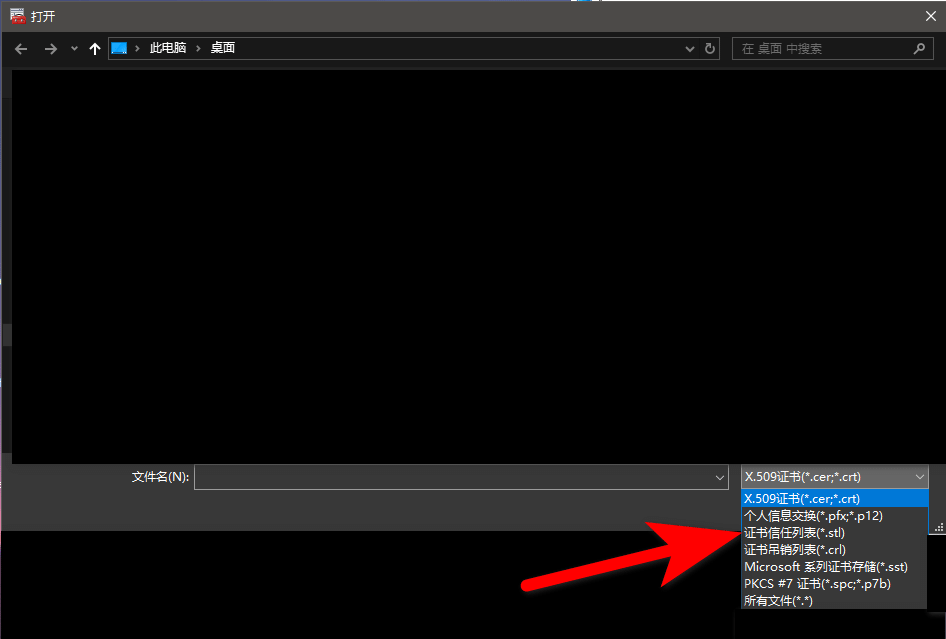
浏览并选择你解压得到的disallowedcert.stl
谷歌浏览器
下载:https://emudhra.we-have-a-problem.com/proof.zip
(来源:https://emudhra.we-have-a-problem.com/)
解压proof.zip
打开chrome://certificate-manager/localcerts/usercerts
在不可信证书旁有个导入,点击后导入proof.zip解压出来的证书。.pub.pem后缀的证书不用导入,导入.crt.pem后缀的就行了。
效果:打开https://emudhra.we-have-a-problem.com/
Does your client still trust the compromised intermediates?下面12项应该全绿了。
至于其他系统的,可以看https://emudhra.we-have-a-problem.com/页面的教程。
附:Chrome在20日发布156稳定版紧急更新,修复了CVE-2026-113328,用户只需要打开特定html即可被攻击者获取权限,拿走数据。
所以必须尽快更新升级浏览器。
快来测一下你的浏览器有没有更新证书,解决印度证书机构那个离谱的 4 证书问题,只需要在浏览器中打开(注意啊,能打开是有漏洞!)
https://dv-g3b-emudhra.we-have-a-problem.com/
dv-g3b-emudhra.we-have-a-problem.com (注意前面自己加 https)
如果能打开,就是漏洞,如果打不开,就是正常。
自测你的浏览器是否还在信任eMudhra的证书
发表回复